Mobile App

Download the AAM 2026 Mobile App
The AAM 2026 Mobile App is critical to a seamless experience at this year’s Annual Meeting and MuseumExpo.

Access the program and plan your schedule (please note that to reduce waste, printed programs were sunsetted after 2019).
Chat with attendees, speakers, and exhibitors, and book appointments while you’re on-site.
Quickly access important information and FAQs, and receive timely notifications from the AAM team.
View the MuseumExpo map to find exhibitors you want to connect with.
Confirm your event tickets (printed event tickets are no longer needed and your badge will be scanned instead).
Take notes on sessions you attend and people you meet, and easily email them to yourself.
Download presenter slides and materials after the Annual Meeting has ended.
Download the App
Search your app store for “AAM Annual Meeting” or use the links below for direct access.
The passcode for entering the app is the same as your AAM 2026 password used during your registration. If you need to reset your password for the App and your Attendee Service Center, do so here.
Troubleshooting the mobile app
How to log in:
Some personalized features of the app ask you log in first:
- Enter the Email Address you used to register.
- Enter your Badge ID.
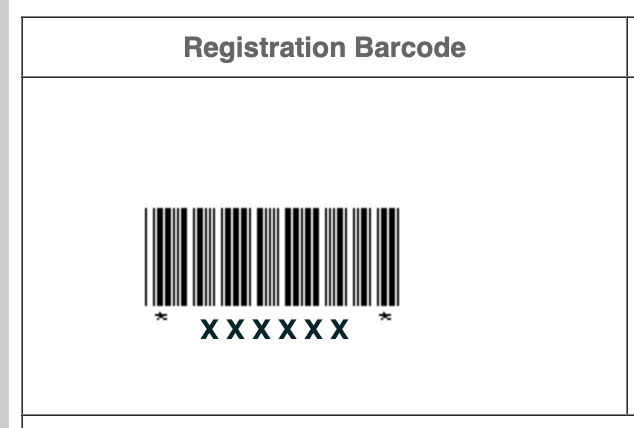
If you are onsite, you have this number on your badge. If you don’t yet have your badge, it is the same as the 6-digit barcode in the registration confirmation email you received. Look in that email for the barcode that looks like this image:
I see a screen to enter a single password (no email), and cannot enter the app.
Please update the app on your device. When it is up-to-date, it should allow you to access many features in the app without logging in. After that, you can tap on the profile/person icon in the app to log in with your email/badge ID and use the more personalized features.
I am in the app, but can’t log in to use some features because it is asking for my email address and password, instead of an email address and badge ID.
In the AAM Annual Meeting app, tap the “hamburger” (three line) menu in the lower right corner. On this screen, please check that it says the “App version is up to date” – if not, please update the app. Tap the “Tap to Refresh” button on the same screen. After that, tap on the profile/person icon in the app to log in with your email/badge ID.
I am entering my email address and 6-digit badge ID, but still cannot log in. (or for any other issue with the app)
If you have updated the app and are still experiencing issues, please ask AAM staff at the Info Desk or Registration Desk at the convention center for assistance.
The American Alliance of Museums’ mission is to champion equitable and impactful museums by connecting people, fostering learning and community, and nurturing museum excellence.